USB Redirector TS Edition - USB device redirection for terminal servers
Archived Product
As an ongoing optimization of our products line, USB Redirector TS Edition has been superceeded with the new USB Redirector RDP Edition v4 which provides all the same functions as the original TS Edition, but refreshed and updated with new features.
Licensed users are welcome to Request an Update to update their licenses to the new version.
To ensure smooth transition, the new USB Redirector RDP Edition v4 is fully compatible with USB Redirector TS Edition v2, so your servers and workstations can be updated gradually.
USB Redirector TS Edition allows redirecting USB devices to Terminal Server where multiple users are working concurrently. This product includes unique technology of per-session isolation which prevents users from accessing each other's USB devices!
Redirection of USB devices in multi-user environment on large Terminal Server systems
Terminal Servers with large number of users working via Remote Desktop are very often used in corporate environments. Sometimes users need to use their individual USB devices inside their RDP session. Our product USB Redirector TS Edition helps to redirect the devices into the remote session!
Why USB isolation is important?
USB devices in Windows are treated as system-wide resource, meaning they are accessible to all users. Such approach works fine for local USB devices, but causes all kinds of issues in multi-user environment of Terminal Server: devices don't work as expected, users are getting confused, they can not distinguish which device belong to which user, they access each-others USB devices.
Even though Windows provides means to control access to the system objects, including devices, this is generally not enough to assign a particular device to a particular user. With the help of our unique per-session device isolation feature, it is possible to solve the problem. USB Redirector TS Edition can isolate users' USB devices in their RDP session, so that they are not accessible or visible by other users.
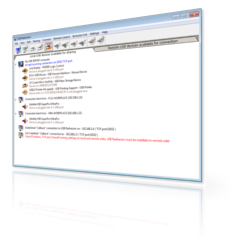
Per-session isolation is currently supported for the following devices
- USB Mass Storage devices - USB Flash Drives, USB Hard Drives, etc.
- USB HID devices - USB Signature Pads, USB Footpedals, some USB Fingerprint Readers, some USB Smart Card Readers, USB Keyboards, USB Mouses, USB Touchpads, etc.
- USB Video devices - Webcams and other USB devices which implement USB Video class. Only video part is isolated, not audio.
- USB CDC devices - USB modems, some USB scale, some USB swipe readers, other USB devices which present themselves as USB-to-Serial adapters of CDC class.
- Other specific USB devices. Device isolation is complicated and has to be developed and tested for each type, or even model, of a USB device. We encourage you to try the free trial and see how it works with your USB devices. If your device is not isolating, Let us know and check for a possibility to support it.
USB Redirector TS Edition works as system service
USB Redirector TS Edition works as a service, this means you don't have to keep the app open all the time. Once you have finished configuring the program, you can safely close it. USB Redirector will continue to work even after reboot.
How to use USB Redirector TS Edition in 4 Steps
- Step 1. Install Workstation part of the program on user's workstation (laptop, thin client, etc.) where USB devices are physically attached.
- Step 2. Install Server part of the program on Terminal Server (Remote Desktop Session Host) where you wish to use USB devices remotely.
- Step 3. Share USB device on Workstation:
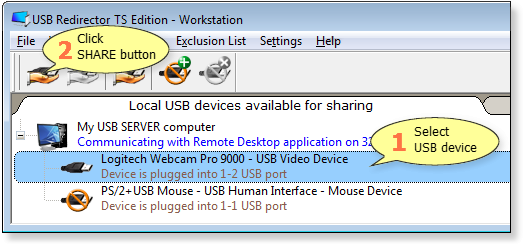
Please note that shared USB device can not be used locally, because it is acquired for redirection into the remote session! To make the device available locally again, you need to unshare it.
- Step 4. Start Remote Desktop Client and log into the Terminal Server:
USB device will be connected automaticaly:
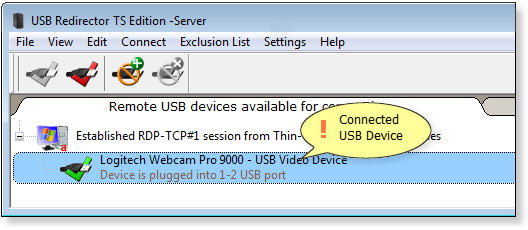
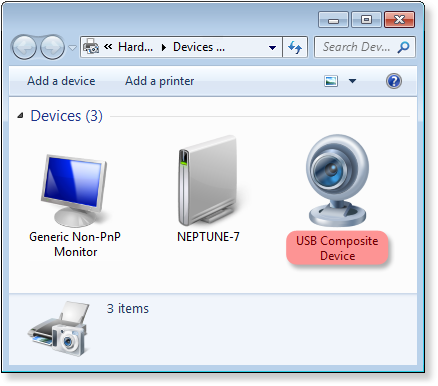
- Result. Now you can use the USB device on the remote server just like it was attached there directly:
Licensing
USB Redirector TS Edition is licensed per Terminal Server and per number of devices that users will be able to connect to the server. You should purchase a license for each of the Terminal Servers where you are going to install Server part of the USB Redirector TS Edition.
System Requirements
USB Redirector TS Edition - Workstation works on the following operating systems (both 32- and 64-bit):
- Windows 11
- Windows 10
- Windows 8.1
- Windows 8
- Windows 7
- Windows Vista
- Windows XP (SP3 or newer)
- Windows 2025 Server
- Windows 2022 Server
- Windows 2019 Server
- Windows 2016 Server
- Windows 2012 R2 Server
- Windows 2012 Server
- Windows 2008 R2 Server
- Windows 2008 Server
- Windows 2003 Server (SP1 or newer)
USB Redirector TS Edition - Server works on the following operating systems (both 32- and 64-bit):
- Windows 2025 Server
- Windows 2022 Server
- Windows 2019 Server
- Windows 2016 Server
- Windows 2012 R2 Server
- Windows 2012 Server
- Windows 2008 R2 Server
- Windows 2008 Server
- Windows 2003 Server (SP1 or newer)
Related Products