USB Redirector - Genuine Remote USB Sharing Over Network
USB Redirector allows sharing and accessing USB devices via Local Network, Wi-Fi, VPN or Internet, as if they were attached directly to your computer! USB Redirector is time-tested reliable software that solves your remote USB needs! The program can act as both USB server and USB client, but there is also a separate light-weight FREE client available. USB Redirector uses a regular TCP/IP connection for communication and works as a service.
USB Redirector helps to:
- Passthrough USB devices to Hyper-V virtual machine or any other virtual machine.
- Organize full-featured USB Server for users in your corporate or home network to share USB devices.
- Use USB devices on a computer where USB ports are damaged or missing.
- Redirect USB devices between computers in your home network or through the Internet.
- Redirect USB devices between Windows and Linux with the help of USB Redirector for Linux.
- Limit physical access to USB device, but make it available for users in your network.
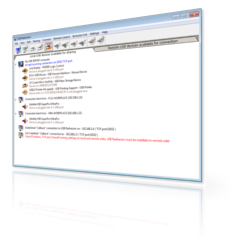
USB Redirector works as a background service
It means you don't have to keep the app open all the time. Once you have finished configuring it, you can close the program. USB Redirector will continue to work even when no user is logged in or after reboot. All the devices that you have shared will remain shared.
Free client is available!
We provide a light-weight USB Redirector Client app that can be used to connect USB devices shared with full-featured USB Redirector. USB Redirector Client is absolutely free if you redirect devices between Windows-based computers (commercial license is required to connect to Linux-based systems). It is available for download in the Downloads section.
Redirect a USB device in 5 steps
- Step 1. Install USB Redirector on a computer where your USB device is physically attached. This computer will act as USB server.
- Step 2. Share required USB device on USB server:
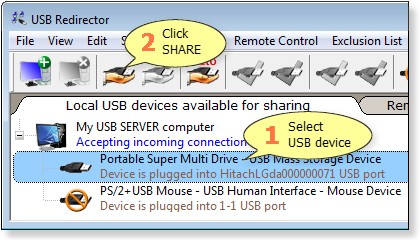
Please note that shared USB device can not be used locally, because it is acquired for individual usage by remote USB clients! To make the device available locally again, you need to unshare it.
- Step 3. Install USB Redirector Client on a computer where you need to use USB devices remotely. This will be your USB client.
- Step 4. Create a direct connection from USB client to USB server or callback connection from USB server to USB client:
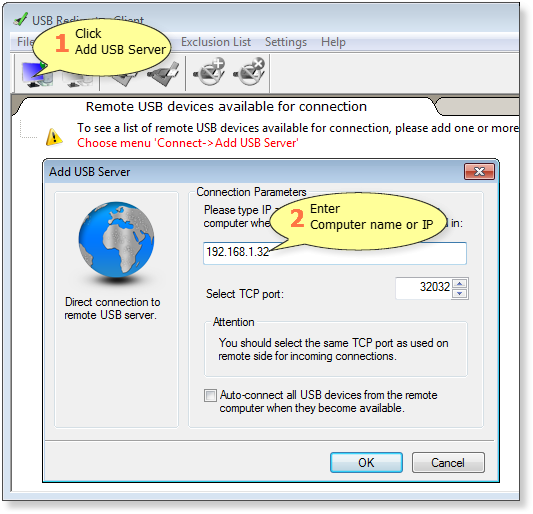
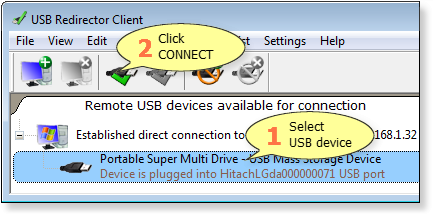
- Step 5. In the list of available USB devices select the needed one and click Connect:
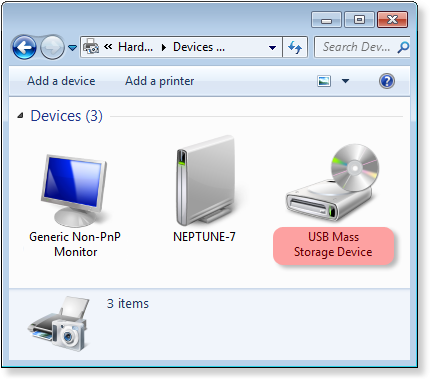
- Result. Now you can use redirected USB device on a remote computer:
Licensing
USB Redirector is licensed per USB server (it is a computer where USB devices are physically attached). You should purchase a license for each computer that will act as USB server. We offer different types of licenses that allow redirecting a certain number of USB devices at the same time. The license should be applied on USB server.
To connect USB devices on the remote computer you can use our FREE USB Redirector Client*.
* USB Redirector Client is free for connecting USB devices shared by USB Redirector. But it is payable for connecting USB devices shared by USB Redirector for Linux.
Pricing
USB Redirector licenses start from USD 74.99, depending on the number of USB devices. There are quantity discounts if you purchase several licenses at once. Check the Purchasing page for details.
System Requirements
USB Redirector works on the following operating systems (both 32-bit and 64-bit).
Windows Desktop/Laptop:
- Windows 11
- Windows 10
- Windows 8.1
- Windows 8
- Windows 7
- Windows Vista
- Windows XP (SP3 or newer)
Windows Server (including Server Core and Hyper-V):
- Windows 2022
- Windows 2019
- Windows 2016
- Windows 2012 R2
- Windows 2012
- Windows 2008 R2
- Windows 2008
- Windows 2003 (SP1 or newer)
Whats Next
Download Free Trial
Fully-functional during 15 days
Related Products