USB Redirector for Linux - Share USB over Network in Linux
This Free product allows to share and access USB devices remotely on Linux platform. This solution is compatible with all of our other USB redirection products. It allows redirecting USB devices between Linux based computers or between Linux and Windows. And with help of the special patch, it is possible to add USB redirection support to the well-known open source remote desktop clients, rdesktop and FreeRDP, so that you can redirect USB devices into remote session on Windows computer where USB Redirector RDP Edition or USB Redirector TS Edition are installed.
USB Redirector for Linux helps to:
- Redirect USB devices to virtual machine.
- Organize USB server in your local or corporate network.
- Use USB devices attached to your Linux thin-client in a Windows Remote Desktop session.
- Use USB devices attached to remote Windows-based computer.
- Limit physical access to USB devices, while allowing users in your network to use them.
How to Start
USB Redirector for Linux can be installed in three modes:
- USB server mode. When installed in this mode, USB Redirector allows to share your USB devices for access on remote computers with Linux or Windows operating systems.
- USB client mode. When installed in this mode, USB Redirecror allows you to connect remote USB devices that were shared on remote computers with Linux or Windows operating systems.
- Combined USB server and USB client mode. You can either share your USB devices for remote access or connect USB devices from remote computers with Linux or Windows operating systems.
USB Redirector installation instructions can be found here.
Redirect a USB Device in 5 Steps
- Step 1.
Download and install USB Redirector for Linux in USB server mode on a computer where USB device is physically attached, this computer will be the USB server:
./installer.sh install-server
- Step 2.
Share needed USB device on USB server:
usbsrv -list-devices
user@cyber:~$ usbsrv -list-devices =================== LIST OF LOCAL USB DEVICES =================== 8: Portable Super Multi Drive HLDS Inc - USB Mass Storage Device Vid: 152e Pid: 2571 Port: 1-4 Status: plugged ===================== ======================= =================== user@cyber:~$
usbsrv -share 8
- Step 3.
Now move to the computer computer where you need to use USB device remotely and install USB Redirector for Linux in USB client mode. This computer will be the USB client:
./installer.sh install-client
- Step 4.
Create direct connection from USB client to USB server (it is also possible to use callback connection from USB server to USB client):
usbclnt -add-server 192.168.1.105:32032
- Step 5.
In the list of remote USB devices choose the needed one and connect it:
usbclnt -list-devices
root@localhost:~$ usbclnt -list-devices ================== LIST OF REMOTE USB DEVICES =================== 1: USB server at 192.168.1.105:32032 Mode: manual-connect Status: connected | `- 8: Portable Super Multi Drive HLDS Inc Vid: 152e Pid: 2571 Port: 1-4 Mode: manual-connect Status: available for connection ===================== ======================= =================== root@localhost:~$
usbclnt -connect 1-8
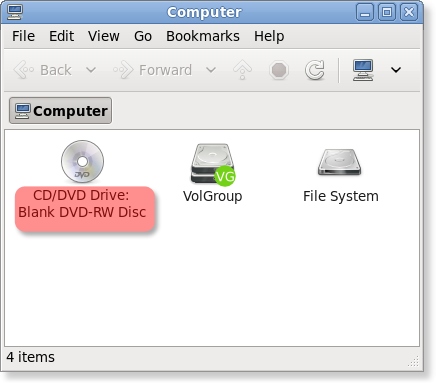
- Result.
Now you can use the USB device on USB client computer just like it was plugged there directly:
Cross-platform Features and Remote Desktop Support
USB Redirector for Linux is compatible with USB Redirector, USB Redirector RDP Edition and USB Redirector TS Edition. It means you can freely share USB devices between Linux and Windows systems without any limitations.
It is possible to redirect USB devices over RDP connection from Linux thin-client to Windows Terminal Server (RD Sesssion Host). For this, you need to use one of the compatible RDP clients. We support the most popular open source Linux Remote Desktop clients, rdesktop and FreeRDP. We provide patches for these RDP clients which add USB over RDP redirection support.
After installing USB Redirector for Linux, you need to apply the special patch, that is shipped inside USB Redirector installation package in the rdp/rdesktop directory:
- Copy usbrdr.c and usbrdr.patch into rdesktop source code directory
- Run patch -p3 -i usbrdr.patch
- Re-compile and re-install patched rdesktop
- Start rdesktop with '-r usbrdr' option:
./rdesktop -r usbrdr terminal.server.hostname
More Information on How to Use USB Redirector for Linux
System Requirements
USB Redirector for Linux works on the following Linux distributions:
- CentOS 5 and newer
- Debian 6 and newer
- Fedora 10 and newer
- Gentoo 10.1 and newer
- openSUSE 11.1 and newer
- RedHat 6 and newer
- Rocky Linux 8 and newer
- Ubuntu 8.10 and newer
- Other systems, which meet the following requirements:
- kernel version 2.6.27 to 6.16
- glibc 2.9 or newer, uclibc or musl libs
- udev subsystem
- r/w file system (not read-only)
- kernel source code or kernel headers are required for installation
- Older systems are supported with previous releases of USB Redirector, thanks to backwards-compatibility of its protocol
Supported architectures:
- x86
- x86_64(amd64)
- arm
- arm64
- mips
- mips64